This article is about the customer app.
Cancel a booking
When you can cancel, why the app asks for a reason, and what the refund note means.
Checked against the app on 2026-11-12.
You can cancel a booking from the booking page.
When can you cancel?
You can cancel a booking that is on hold, waiting for the business, approved or confirmed. Once a booking is done, declined or cancelled, there is no cancel button.
Steps
- Open the booking. See Open a booking and see its details.
- Tap “Cancel booking”.
- The sheet “Cancel this booking?” opens. Type a “Reason”. A reason is required. It can be up to 500 characters.
- Tap “Confirm cancellation”. To change your mind, tap “Keep booking”.
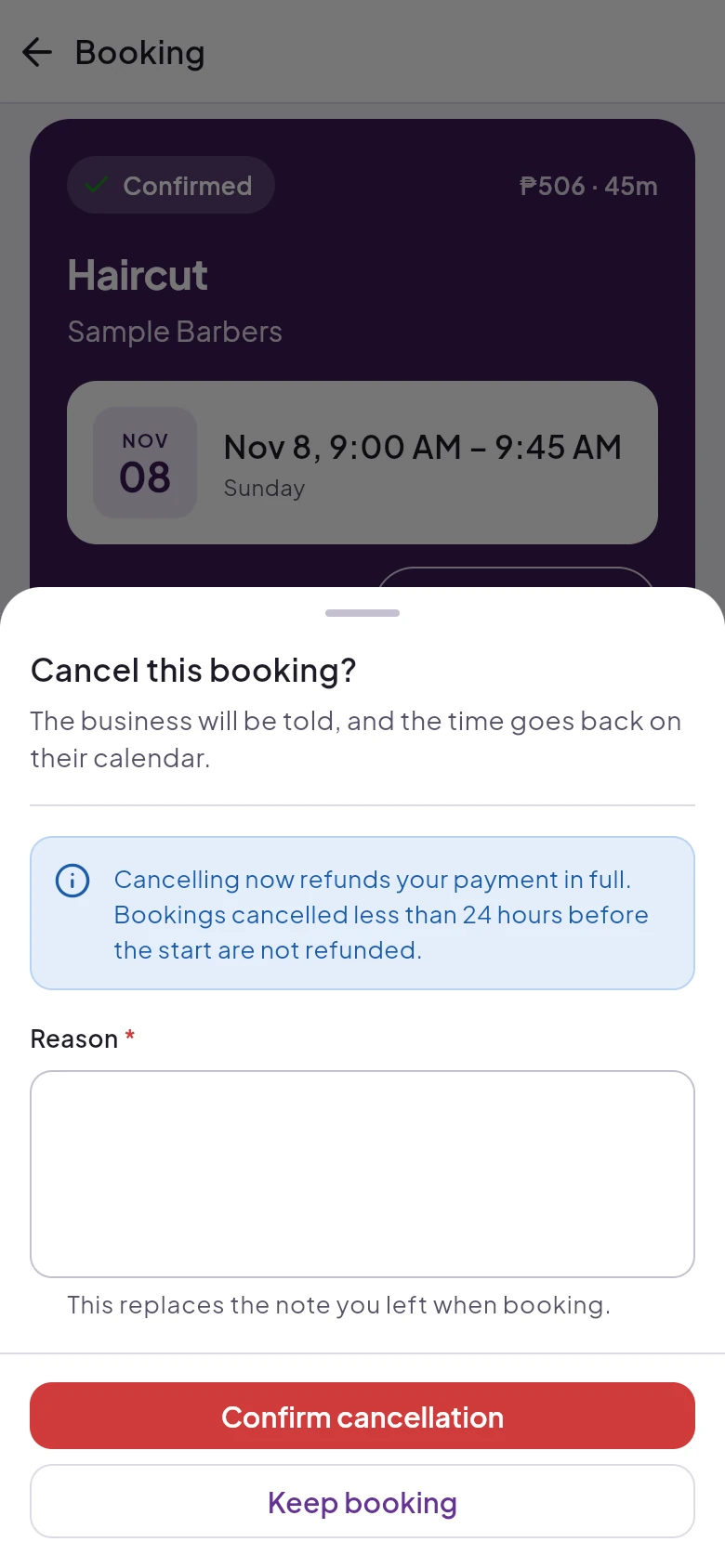
The business is told, and the time goes back on their calendar.
About refunds
If a payment was collected for your booking, the sheet shows a note. It says: “Cancelling now refunds your payment in full. Bookings cancelled less than 24 hours before the start are not refunded.”
If you have not paid yet, for example when you pay at the counter, there is no refund note.
Common problems
- There is no cancel button. The booking is already done, declined or cancelled.
- The app asks for a reason. Type one. It replaces the note you left when you booked.