This article is about the business app.
Find your way around the business app
The bottom bar, the More menu, and what only the owner can open.
Checked against the app on 2026-11-12.
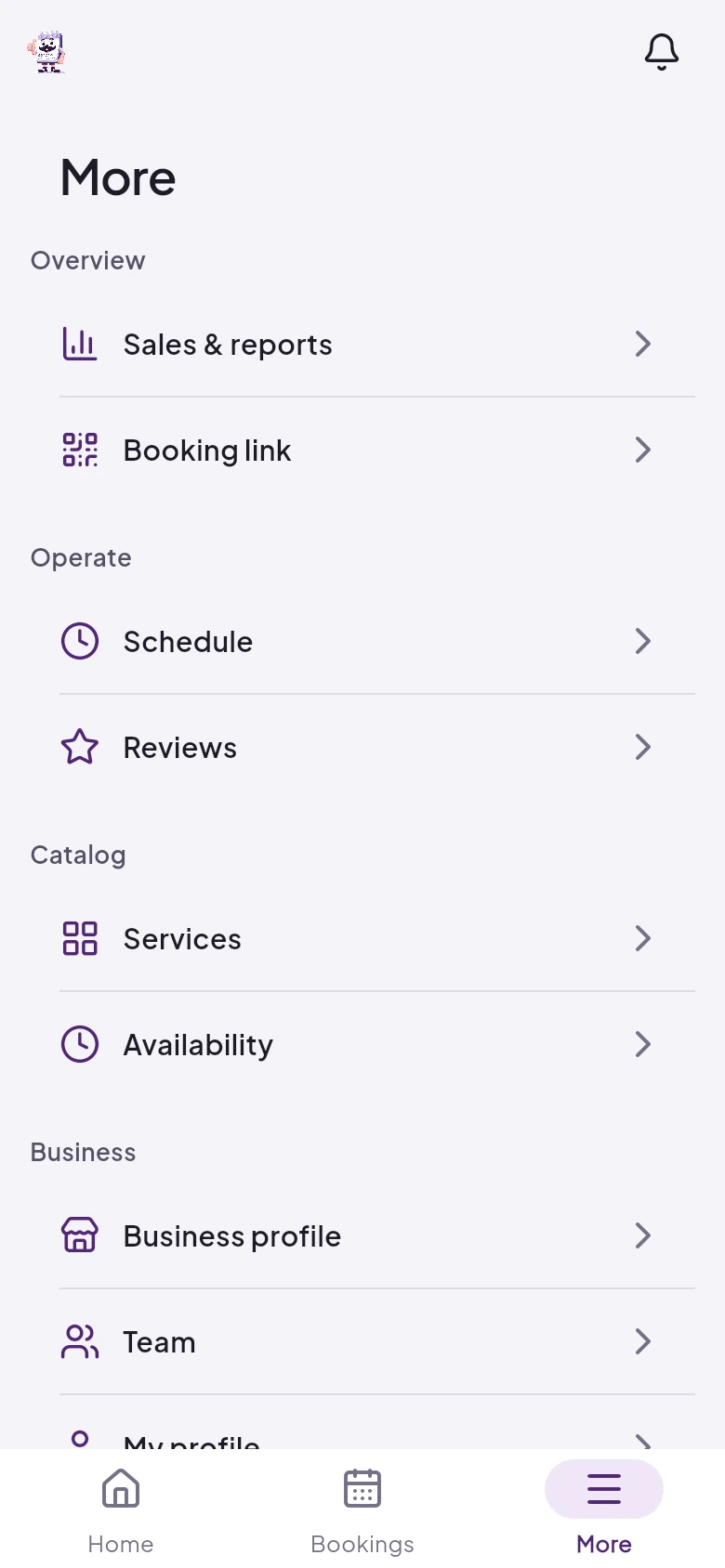
The business app has a bottom bar and a “More” menu.
The bottom bar and the bell
- “Home” is your Dashboard. See Read your dashboard.
- “Bookings” is your list of bookings. See Find your bookings.
- “More” opens the menu below.
- The bell at the top opens “Notifications”. See Notifications and reminders.
The More menu
The menu has groups:
- “Overview”: “Sales & reports” and “Booking link”.
- “Operate”: “Schedule” and “Reviews”.
- “Catalog”: “Services” and “Availability”.
- “Business”: “Business profile”, “Team”, “My profile” and “Subscription”.
- “Help & legal”: “Terms & Privacy” and “Report a bug”.
What a team member sees
Some pages are for the owner only. A team member does not see Sales & reports, Booking link, Schedule, Services, Availability, Business profile, Team or Subscription. Team members can open Reviews, My profile, Terms & Privacy and Report a bug.