This article is about the business app.
Your subscription and limits
See your plan, when it renews, and how close you are to each limit.
Checked against the app on 2026-11-12.
The “Subscription” page shows the plan your business is on. A business has one subscription. This page is for the owner only.
How to open it
Open Subscription from the More menu. See Find your way around the business app.
What you see
- The plan. Its name, when it started, and when it renews or expires. A plan with no end date says so.
- “Your limits”. Only the parts of your plan that have a cap are listed. If nothing is capped, the app says so.
- “What your plan lets you do”. A list of areas such as Bookings, Services and availability, and Team members. Each says whether it has a limit.
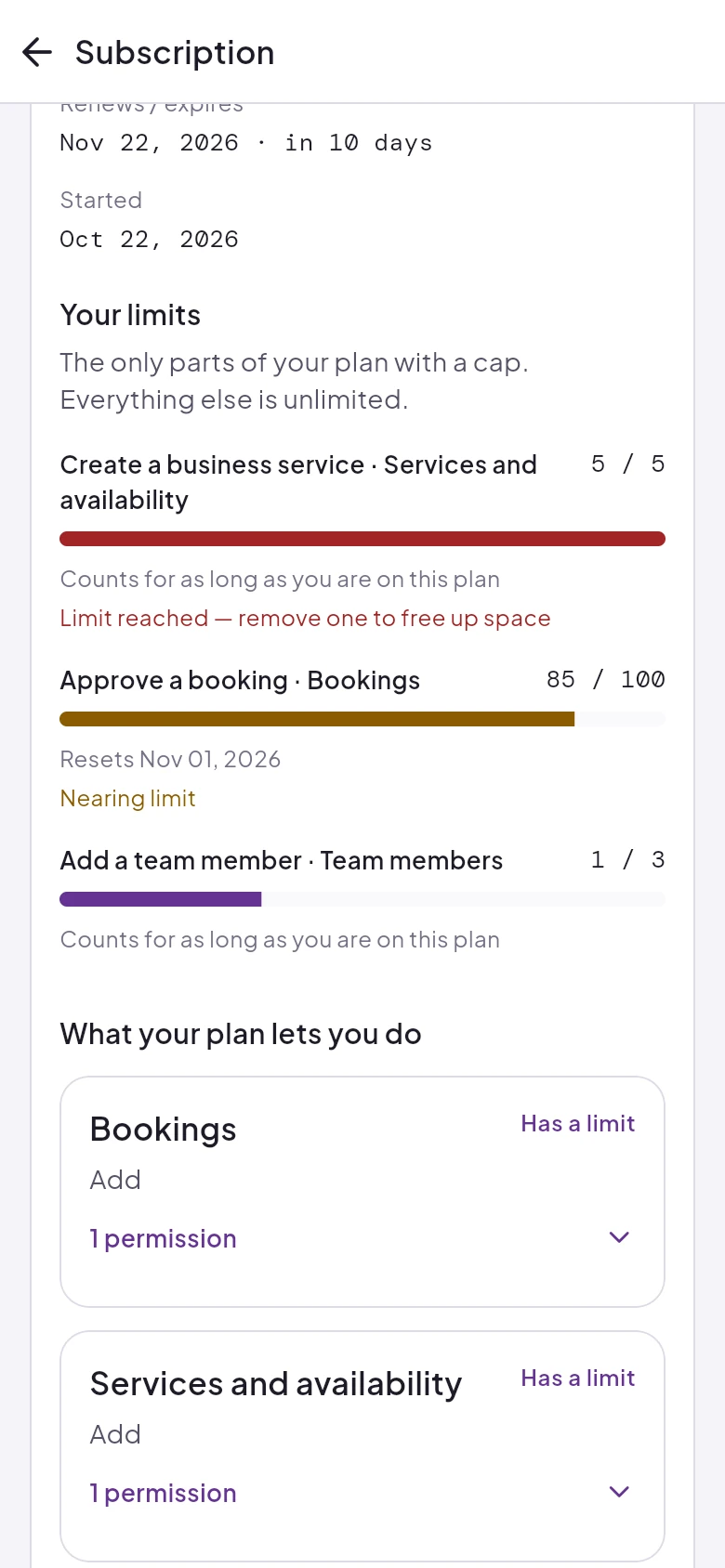
The numbers in the picture are samples.
Limits you may meet
Some limits are tied to an action, for example “Create a business service”, “Approve a booking” and “Add a team member”. Each shows how much you used of the limit.
- “Nearing limit”. You used 80 percent or more of it.
- Limit reached. For a limit that counts for as long as you are on the plan, the app says to remove one to free up space. For a limit that resets each month, it shows the date you can use it again.
To change your plan, see Choose a plan and change it later.